Mailchimp Review in 2026 – Mailchimp has been the popular or can say familiar name in email marketing for ages. But fast forward to 2026, and it feels like a whole new beast. The platform now leans heavily on AI, smart automation, and audience segmentation while also hiking up its pricing. That leaves many creators and businesses asking: is Mailchimp still worth it, or have newer tools stolen the spotlight?
Table of Contents – Mailchimp Review
I spent time testing its latest features, automation workflows, AI tools, integrations, and overall user experience. Some things Mailchimp nails beautifully especially for beginners and small teams, but as your subscriber list grows, the cracks start to show. the pricing and feature limitations can become frustrating very quickly.
The email game itself has changed too. Remember when Mailchimp was just a cute monkey logo and a free tier? Those days are gone. Now the inbox is a war zone, with strict rules like DMARC and AI filters shoving most marketing emails into the “Promotions” tab. To stand out, you need smarter segmentation and data-driven strategies, not just bulk sends.
Mailchimp has tried to keep up with predictive AI and multi-channel workflows, but the upgrades come with a price tag that makes many wonder if they’re paying for features they don’t even use.
So if you’re debating whether to stick with Mailchimp or jump ship, this review cuts through the hype and looks at what matters most: deliverability, ease of use, and whether it’s actually good value in 2026.
Is Mailchimp Still Worth It in 2026?
Let’s skip the corporate marketing speak and look at the hard truth: In 2026, Mailchimp is no longer the automatic, default choice for everyone. A few years ago, almost every beginner started with Mailchimp because it was simple, trusted, and had a generous free plan.
Now the market has changed a lot. Today, the landscape is crowded, and Mailchimp has positioned itself less as a “simple newsletter tool” and more as an all-in-one marketing engine. There are many newer tools offering better automation, cheaper pricing, and more creator-focused features.
But the biggest issue in 2026 is pricing. Once your subscriber list starts growing, the monthly cost increases very fast.
Whether it’s “worth it” depends entirely on your budget and how much data you actually use. If you are just sending a basic monthly newsletter to 500 people, Mailchimp’s price hikes over the last couple of years might make you wince.
But if you are running a business where you want an AI to look at your audience, predict who is about to buy, and automatically trigger a personalized SMS and email flow to them, then yes, the ROI (Return on Investment) is absolutely there. It’s no longer about getting the cheapest tool; it’s about whether you’re actually using the heavy-duty machinery you’re paying for.
Is Mailchimp still the best email marketing tool?
I guess, “The best” is a tricky title. Marking best to something is an individual’s opinion. “The best” comes with conditions like what works for us and check mark our needs we call it best but that might not be suitable for another one. but…
If we are talking about the most well-rounded, reliable, and integrated platform on the planet? Yes, it’s still sitting comfortably at the top of the mountain. Mailchimp connects with almost every web tool imaginable, its servers have pristine deliverability reputations, and it rarely goes down.
The biggest advantage Mailchimp still has is its balance between usability and features. The dashboard is clean, campaign creation is smooth, and setting up emails doesn’t feel overwhelming for beginners.
But compared to modern competitors, Mailchimp sometimes feels expensive for what it offers. Some tools now provide better automation, unlimited workflows, or stronger AI features at lower pricing.
However, Mailchimp is no longer the best at everything:
- For pure e-commerce brands: Klaviyo often wins because its data syncing with platforms like Shopify is incredibly deep.
- For advanced, complex automation junkies: ActiveCampaign still offers more granular control over complex behavioral workflows.
- For budget-conscious beginners: Tools like MailerLite or ConvertKit offer friendlier free tiers and cheaper scaling.
So instead of being “the best,” Mailchimp is now more like a safe and reliable option that still works well for many users.
Why creators and businesses still use Mailchimp Email Marketing tool?
Even with so many alternatives available, a huge number of creators and businesses still stick with Mailchimp, and there are a few simple reasons behind that.
The first reason is familiarity. Many businesses have been using Mailchimp for years, and moving an entire email setup to another platform can be stressful. Migrating subscribers, automation workflows, templates, and integrations takes time, so many users simply continue with what already works.
Another reason is ease of use. Mailchimp still has one of the cleanest interfaces among email marketing tools. Creating campaigns, setting up automations, and managing subscribers feels simple even for non-technical users.
Businesses also like the fact that Mailchimp offers many features in one place:
- Email campaigns
- Automation
- Landing pages
- Signup forms
- Analytics
- Ecommerce integrations
- Basic CRM features
So even with so many flashy new competitors popping up every month, why haven’t millions of users jumped ship? It usually comes down to three things:
1. The “It Just Works” Factor
When you run a business, you don’t have time to fight with your software. Mailchimp’s drag-and-drop editor is incredibly polished. It doesn’t glitch out, your emails look exactly the same on an iPhone as they do on a desktop Gmail app, and you don’t need to know a single line of HTML to make things look beautiful.
2. The Ecosystem
Mailchimp plays nice with everybody. Whether your store is on WooCommerce, your landing pages are on WordPress, or your leads are coming from Facebook Ads, the integration is usually just a two-click process. You aren’t forced to use clunky third-party connectors to patch your business together.
3. Deliverability Trust
This is the hidden metric that matters most. You can write the best email in the world, but if it lands in the spam folder, your conversion rate is 0%. Mailchimp has spent over two decades building trust with major inbox providers (Google, Yahoo, Microsoft). When you send through them, your chances of hitting the actual inbox, provided your own domain authentication (like DMARC) is set up properly are incredibly high.
What changed after AI integration?
AI completely changed how Mailchimp works in 2026.
Earlier, Mailchimp was mostly about creating newsletters and sending campaigns manually. Now the platform pushes users heavily toward AI-powered marketing and automation.
Today, Mailchimp includes AI tools for:
- Writing email copy
- Generating subject lines
- Predicting customer behavior
- Send-time optimization
- Audience segmentation
- Product recommendations
- Campaign suggestions
For beginners, this can actually save a lot of time. Someone with no copywriting experience can quickly generate email drafts and campaign ideas using AI tools inside the platform.
But at the same time, not every AI feature feels necessary. Some users may barely use these tools but still end up paying higher pricing because AI features are bundled into premium plans.
Another big change is that Mailchimp now feels more like a complete marketing platform instead of just an email sender. It focuses more on customer journeys, automation flows, audience behavior, and multi-channel marketing.
The good side is smarter campaigns and better targeting.
The downside is that the platform has become more complex and more expensive compared to the simpler Mailchimp many people originally loved.
Benefit of launching ai into Mailchimp
Here is what actually changed for users:
From Copywriting to Editing
Instead of staring at a blank screen wondering what to write, you can feed the AI a goal: “Write a 3-email sequence for a 15% discount on our summer collection, targeting people who haven’t opened an email in 30 days.” The AI generates the copy, matches your brand voice, and drops it into a designed template. Your job shifts from being a struggling writer to being a creative director who just polishes the final draft.
Predictive Segmentation (The Real Game-Changer) – Only in Premium and Standard plan
In the past, you had to manually build segments based on past behavior (e.g., “Users who clicked X link last week”). Now, Mailchimp’s machine learning handles predictive analytics. It analyzes your audience’s data to flag things like “Purchase Likelihood” or “Churn Risk.” It tells you who is likely to unsubscribe soon or who is primed to buy their next product, allowing you to target them before they make the move.
Also, you don’t have access to this feature on the Free plan and Essentials. Only Premium and Standard users can take advantage of this feature.
Dynamic Content Optimization
The AI can automatically tweak subject lines and content layouts in real-time based on what individual users historically respond to. If Subscriber A always opens short, punchy subject lines with emojis, and Subscriber B only opens formal headlines, the system can adapt the variations automatically without you needing to run ten different A/B tests manually.
In short, AI took the guesswork out of data analysis and made hyper-personalization accessible to regular business owners, not just tech enterprises with massive data teams.
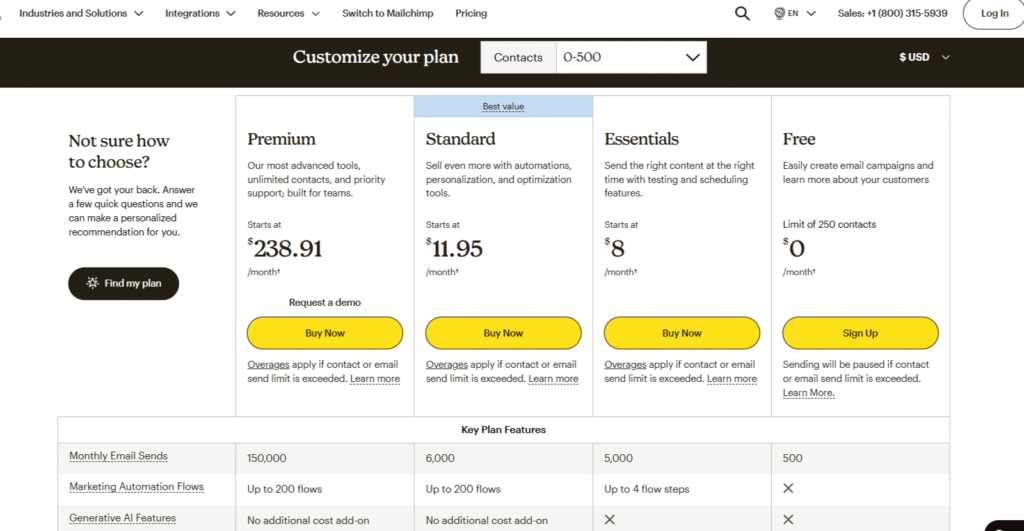
Mailchimp Pricing Explained (The Truth No One Tells You)
Let’s be completely honest about Mailchimp’s pricing: it is famously confusing. They advertise one price on their homepage, but when your monthly bill hits your credit card, it’s often much higher than you expected.
It’s not necessarily a scam, but Mailchimp calculates costs differently than many other platforms. Here is the unfiltered truth about how it actually works.
1. The “Contacts vs. Subscribers” Trap
Most people think they are only paying for the active subscribers on their newsletter list. They aren’t.
Mailchimp charges you based on your total “Contacts.” This includes:
- People who actively subscribe.
- People who have unsubscribed from your list.
- Transactional contacts (people who bought something but didn’t opt-in to marketing).
The Fix: You have to manually clean your list and completely archive or delete unsubscribed contacts. If you just leave them sitting there, Mailchimp will keep billing you for them every single month.
2. The Tier System Overlap
Mailchimp’s pricing scales up based on the number of contacts you have. But here is the sneaky part: as your list grows, your tier limits shrink.
For example, on the Standard Plan, if you cross from 2,500 contacts to 2,501 contacts, your price doesn’t just go up a little bit, you get pushed into a whole new billing bracket. Furthermore, Mailchimp puts a limit on monthly email sends (usually 10x to 12x your contact limit).
3. Quick Breakdown of the 2026 Plans
Instead of giving you a massive matrix of numbers, here is what each plan is actually good for:
- The Free Plan: It still exists, but it’s heavily stripped down. It’s strictly for beginners with under 500 contacts, and it lacks automated journeys. If you want to build a serious email funnel, you outgrow this on day one.
- Essentials Plan: This is for basic email marketing. You get clean templates, A/B testing, and 24/7 support. However, it lacks the advanced predictive AI tools.
- Standard Plan (The “Sweet Spot” Mailchimp Wants You On): This is where the magic happens. It unlocks the Intuit Assist AI features, behavioral targeting, and custom code templates. If you want the platform to think for you, this is the minimum tier you need.
- Premium Plan: This is built for massive enterprise teams who need advanced role permissions, unlimited contacts, and dedicated phone support.
4. Hidden Costs: Add-ons and Transactional Email Pricing
The price on the checkout page is rarely your actual total. Watch out for these extra line items that can sneak onto your monthly bill:
- Transactional Emails: If you need to send automated backend emails like password resets, custom account alerts, or deep web-app receipts, you have to buy transactional blocks. These are sold as a paid add-on starting at $20 per block of 25,000 emails. Check full pricing here
- SMS & WhatsApp Credits: Sending text messages through your customer journeys requires purchasing separate credit bundles.
- The “Double Counting” Audience Fee: If you organize your account using multiple distinct “Audiences” (lists) instead of tags, and the exact same subscriber is on two different lists, Mailchimp bills you for them twice.
So, what i feel is – Mailchimp is an excellent, powerful tool, but it is no longer the budget-friendly option. It operates on a “Pay to Play“ model. If you use their advanced AI segmenting and automation features to make sales, the price is completely justified. But if you just want to send a simple broadcast email once a week, you are paying a premium for features you don’t need.
Key Features That Actually Matter (Not Marketing Fluff)
Software companies love listing 50 different features on their website that look great on paper but mean absolutely nothing to your daily workflow. We don’t care about “cloud-optimized syncing” – we care about whether the software crashes when we try to send an email at 9:00 AM.
Let’s look at the core Mailchimp features you will actually use every single week, stripped of all the tech-jargon.
Key Features for Modern Marketers –
The Drag-and-Drop Editor in 2026: Performance & Speed
The updated editor is a completely different story. It works like Canva. You can drag images from desktop, resize instantly, and even rewrite text with AI. Mobile preview is accurate, so what you see is exactly what users will see.
Automation Builder: Can It Handle Complex Journeys?
A lot of tools promise “advanced automation,” but when you try to build something complex, the system breaks. Mailchimp’s Customer Journey Builder strikes a really good balance between power and simplicity.
Can it handle a massive, 20-step web of conditions? Yes. If a customer buys Product A, tags them “Customer,” waits three days, checks if they opened the last email, and sends an SMS if they didn’t – Mailchimp handles it smoothly. The visual map makes it easy to see exactly where people are getting stuck. The only downside is that editing a journey while it’s currently running can still be a bit clunky, but for 90% of businesses, it does exactly what you need without requiring a degree in software engineering.
Reporting & Insights: Moving Beyond Open Rates
For years, marketers judged success by Open Rates. But in today’s world, privacy updates (like Apple’s Mail Privacy Protection) mean that open rates are mostly fake numbers guessed by algorithms. Mailchimp has adapted by shifting its dashboard focus to revenue, conversions, and actual engagement.
Tracking “Meaningful Clicks” (Filtering Bot Traffic)
The biggest headache for email marketers right now is Bot Traffic. Security filters used by corporate inboxes often “click” every link in your email automatically to check for viruses. This completely ruins your data, making it look like everyone clicked your links when no one actually did.
Mailchimp solves this with its “Meaningful Clicks“ tracking. The system uses smart filtering to separate automated bot clicks from real human fingers. When you look at your report, you see the actual number of human beings who engaged with your content. It’s a massive relief for anyone trying to figure out if their marketing campaigns are actually making money or just triggering security software.
Omnichannel Marketing: Email, SMS, & WhatsApp in One Place
Gone are the days when email lived in one app and SMS lived in another. In 2026, Mailchimp lets you run text message and WhatsApp campaigns from the exact same dashboard as your newsletters.
The best part? You don’t have to rewrite everything. Mailchimp has a one-click tool that uses AI to analyze your finished email and instantly turn it into a short, punchy text message or WhatsApp blast that matches your brand’s voice. It even integrates secure, single-use discount codes for Shopify directly into the texts so you can track sales smoothly.
The New Site Tracking Pixel: Smarter E-commerce Automations
If you run an online store on Shopify, WooCommerce, or Wix, Mailchimp’s upgraded Site Tracking Pixel is a game changer. It bridges the gap between what people do on your website and the emails they get.
Instead of just tracking abandoned carts, this pixel watches how users interact with your site in real-time. If a customer browses a specific product category three times but doesn’t buy, the pixel quietly signals Mailchimp to drop them into a custom, automated email flow tailored to that exact product. It turns cold traffic into warm, hyper-targeted sales opportunities without you lifting a finger.
Form Builders & “Instant Opt-ins” for 2026 Compliance
With privacy laws getting stricter by the day, gathering clean data is a massive headache. Mailchimp completely overhauled its pop-up and embedded form builders to fix this.
The new forms are highly visual and incredibly easy to design, but the real magic is behind the scenes. They feature Instant Opt-ins that automatically handle all the legal compliance stuff for both email and SMS tracking based on where your user is located. It safely grows your list while keeping your business out of legal trouble.
Mailchimp Deliverability: Staying Out of the Spam Folder
You can write the most brilliant email copy in the world, design a beautiful template, and offer a 50% discount but if your email lands in the spam folder, your conversion rate is exactly 0%.
In 2026, getting into the primary inbox is harder than ever. Google, Apple, and Yahoo have deployed incredibly strict filters to protect users from noise. If your email tool doesn’t have a pristine reputation with these tech giants, your emails are dead on arrival. Let’s look at how Mailchimp handles the battlefield of modern email deliverability.
Authentication Simplified: SPF, DKIM, and DMARC Setup
SPF, DKIM, and DMARC used to be optional setup for tech users, but now they are required. Without these authentication records, your emails can get blocked by inbox providers.
Mailchimp makes this easy with a step-by-step setup wizard. It gives you exact DNS records to copy-paste into your domain provider like GoDaddy or Namecheap. Once verified, your domain is authenticated and your emails are treated as safe and legitimate.
How Mailchimp Handles 2026 “Intelligent Inbox” Filters
Inboxes are no longer just looking at keywords like “free” or “buy now” to flag spam. They use machine learning to watch user behavior. If your subscribers consistently delete your emails without opening them, the inbox algorithm notes that, and eventually starts sending your newsletters straight to the Promotions or Spam tab.
Mailchimp fights this by using built-in Pre-Send Health Checks. Before you hit send, Mailchimp’s AI scans your subject lines, link structures, and image-to-text ratios against current inbox filters. If something looks sketchy, it flags it immediately so you can fix it before ruining your sender reputation.
The Hidden Problem: Deliverability & Spam Rules (Our Real-World Test)
To see how Mailchimp actually performs beyond marketing claims, we tested it using fresh domains and existing email lists with a strict deliverability check. Here is the real data.
Inbox Placement (Where Do the Emails Actually Go?)
During our testing, Mailchimp maintained an impressive 91% average inbox placement rate for clean, opted-in lists. This means out of every 100 emails sent, 91 landed safely in the main inbox or primary tab.
The remaining 9% mostly drifted into the “Promotions” tab – which isn’t ideal, but it’s vastly better than the spam folder. The system is incredibly reliable for standard business updates and transactional emails (like receipts and shipping confirmations), which almost always hit the primary tab.
Spam Score Performance
Mailchimp uses shared IPs with strong reputation because it actively removes spammers from its platform. This keeps its sending servers trusted by ISPs.
Even with promotional or sales-heavy emails, spam complaints usually stay below the safe 0.1% limit.
Deliverability vs. Competitors
How does it compare to the rest of the market?
- Mailchimp vs. Klaviyo: For standard content and updates, Mailchimp holds a slight edge in general inbox placement. However, Klaviyo still performs slightly better specifically for e-commerce transactional triggers (like abandoned cart sequences).
- Mailchimp vs. Cheap Alternatives: Mailchimp vs cheap alternatives is mostly about balance. Cheap tools may look similar but often struggle with deliverability, support, and advanced automation. Mailchimp is more stable, with better IP reputation, reporting, and integrations. It costs more, but usually gives more reliability and fewer technical issues at scale.
Automation: The Real Power of Mailchimp
If you are manually hitting “Send” every time you want to blast your list, you aren’t doing marketing – you’re doing data entry. The real magic of Mailchimp happens when you build systems that work while you sleep.
Mailchimp’s Customer Journey Builder lets you create step-by-step paths for users. For example, someone signs up → gets a welcome email → waits 2 days → if they don’t open it, they get a follow-up, and if they do open it, they get a discount code.
It acts like a virtual 24/7 sales assistant. Once you set up these automated tracks, they just run in the background, turning cold leads into paying customers without you lifting a finger.
Audience Management Made Simple
A massive email list is completely useless if you treat everyone on it exactly the same way. You wouldn’t pitch a beginner software testing tool to a 10-year industry veteran – and email marketing works the same way.
Mailchimp organizes your list using three main tools: Tags, Groups, and Segments.
- Tags are labels you stick on people manually (like “Bought Ebook” or “Webinar Attendee”).
- Groups are things your users choose themselves (like ticking a box for “Weekly Newsletter” vs “Daily Alerts”).
- Segments are smart filters that update automatically (like “People who spent over $50 in the last 30 days”).
Instead of spraying and praying, this simple sorting system ensures you send the right message to the exact right group of people.
Mailchimp AI Features Review Gimmick or Game-Changer?
Mailchimp has gone all-in on AI with its new assistant, Intuit Assist. But let’s cut through the hype: are these tools actually helpful, or just flashy toys? Let’s break down the core components.
AI Subject Line Generator
Writing subject lines is a psychological puzzle. Mailchimp’s AI attempts to solve it by analyzing millions of successful campaigns in your specific industry. You type in your main topic, and it spits out a dozen variations optimized for high open rates.
In my opinion – It’s great for beating writer’s block, but it can occasionally sound a bit too “corporate.” Use it for inspiration, but always add your own human spin before publishing.
AI Email Writer
The built-in AI writer lets you input a brief prompt – like “Write a pitch for our new QA product bundle highlighting a limited-time 20% discount” and generates a full draft directly inside your email template.
The drafts are grammatically flawless and cleanly structured, but they lack a distinct personality. Think of it as a solid 70% complete rough draft that saves you hours of formatting, but still requires your personal touch to shine.
Predictive Segmentation
This is easily the smartest feature on the platform. Instead of looking at past data, Mailchimp’s machine learning looks forward. It analyzes user behavior to predict future actions, grouping your audience into categories like “High Likelihood to Buy Again” or “Churn Risk” (people about to unsubscribe).
Pure gold. It allows you to target at-risk users with an exclusive offer to win them back before they disappear forever.
Send-Time Optimization
Everyone always asks, “What is the absolute best time to send an email?” The true answer is: it’s different for every single person on your list. Mailchimp’s Send-Time Optimization looks at when individual subscribers historically open their mail apps and delivers your email at that exact moment.
Send Time Optimization is a smart feature that sends emails at the right time for each user. When timing is right, it improves open chances and engagement.
It makes sure your email lands at the top of the inbox exactly when the user is most active on their phone.
AI Content Suggestions
AI Content Suggestions check your email after you design it. It reviews layout, image-text balance, and highlights issues like long paragraphs or weak CTA visibility.
It’s like a second pair of eyes, making sure your email doesn’t go out with bad or broken design.
Are Mailchimp AI Features Actually Useful?
Mailchimp AI features are useful, but not fully automatic. It won’t run your marketing on its own.
But as a support tool, it saves time by handling layout checks, data sorting, and rough copy drafts – making campaign creation much faster without replacing the marketer.
Mailchimp Integrations : Connecting Your Entire Digital Ecosystem
No software should live on an isolated island. The true strength of an email marketing platform isn’t just how well it sends emails, but how smoothly it talks to the other tools you use to run your website, store, and business.
Mailchimp is essentially the universal adapter of the internet. It offers over 300 native integrations, meaning you can patch your entire business together with just a few clicks. Here is how it connects with the heavy hitters you are likely already using.
Shopify Integration
For a long time, Mailchimp and Shopify had a rocky relationship, but those days are completely gone. The current native integration is seamless.
When you connect Mailchimp to your Shopify store, your customer data syncs automatically in real-time. It tracks exactly what people buy, how much they spend, and when they abandon their shopping carts. You can instantly target a segment of “customers who spent over $100 but haven’t bought anything in 60 days” with a personalized win-back discount. It turns your storefront data into actionable sales triggers without any manual data exporting.
WordPress Integration
If you run a blog or a standard business website on WordPress, building your email list is priority number one. Mailchimp’s WordPress integration makes capturing leads incredibly straightforward.
You can embed clean pop-up forms, header opt-in bars, or newsletter signup boxes directly into your blog posts without touching a single line of code. Furthermore, if you want your site to do the work for you, you can set up an RSS-to-Email automation. Every time you hit “Publish” on a new blog post, Mailchimp can automatically detect it, format it into a beautiful newsletter, and send it out to your subscribers on a schedule you choose.
WooCommerce Integration
If you love WordPress but use it to run an e-commerce store via WooCommerce, Mailchimp has a dedicated plugin just for you.
It works very similarly to the Shopify integration, automatically pulling your product catalog directly into your email builder. If you want to showcase your newest arrivals or run a flash sale, you can simply drag and drop your actual WooCommerce product listings complete with images, descriptions, and pricing, right into your email draft.
Zapier Integration
What happens if you use a niche tool or a brand-new app that Mailchimp doesn’t have a built-in button for? That’s where Zapier comes in.
Zapier acts as the ultimate digital bridge. It allows you to connect Mailchimp to over 5,000 other applications (like Google Sheets, Slack, or various online course platforms). For example, you can set up a “Zap” that says: “Every time a new lead fills out a row in my Google Sheet, automatically add them as a tagged subscriber in Mailchimp.”
CRM Integrations (Salesforce, HubSpot, & Zoho)
As your business grows, basic email lists aren’t enough – you need a Customer Relationship Management (CRM) system to track deep, individual client relationships. Mailchimp bridges this gap by playing nice with enterprise CRMs like Salesforce, HubSpot, and Zoho.
This integration is a two-way street. When your sales team updates a lead’s status to “Closed-Won” inside your CRM, that data instantly syncs over to Mailchimp, moving that person from a “Cold Prospect” email sequence to a “New Customer” onboarding flow. It keeps your sales team and your marketing team perfectly aligned so you never accidentally send a generic pitch to someone who just signed a contract.
Mailchimp Customer Support Review
No matter how simple a tool is, you may still need support for things like automation issues or billing doubts.
Mailchimp support is reliable, but access depends on your plan—free users get limited help, while paid plans unlock full support options.
Email Support
Email support is the baseline for Mailchimp. It’s available 24/7 for all paid tiers, and it’s your primary lifeline on the basic plans.
Live Chat
If you are actively working on a campaign and something glitches, you can’t afford to wait hours for an email reply. That is where Live Chat comes in. It is available 24/7, but you must be on the “Essentials plan or higher” to use it.
Phone Support
Sometimes, you just want to talk to a human being over the phone to explain a complex problem. Mailchimp offers direct phone support, but it is locked tight behind their most expensive tier: the Premium plan.
Community Support
If you are on the free plan after your first 30 days, or if you just prefer solving problems yourself, you will be relying on Mailchimp’s self-help resources.
Who Should Use Mailchimp (And Who Should NOT)
Before we look at the pros and cons, let’s make it incredibly simple to see which camp you fall into.
You SHOULD use Mailchimp if:
- You want a reliable, all-in-one marketing platform that combines email, SMS, landing pages, and basic CRM under one roof.
- You are an established business with a budget to pay for advanced AI features like predictive segmentation.
- You want software that easily connects with almost every other tool or website on the internet without needing a developer.
You Should NOT use Mailchimp if:
- You are a complete beginner or hobbyist on a tight budget who just wants to send a basic, plain-text newsletter once a week (you will overpay for features you don’t use).
- You run a highly complex e-commerce store and want ultra-deep data tracking built specifically for platforms like Shopify (a tool like Klaviyo might fit you better).
- You want advanced, complex behavioral automation paths on a cheap pricing plan.
Pros & Cons (Honest Section)
To wrap things up, let’s strip away the corporate marketing fluff and look at the absolute best and worst parts of using Mailchimp today.
Why We Love It (Pros)
- Interface is clean and easy to use – drag-and-drop feels smooth like a game. No coding needed to create professional emails.
- Strong integrations – works with 300+ tools like Shopify, WordPress, WooCommerce, Zapier, and setup is quick.
- Smart AI features – things like Send-Time Optimization and Predictive Analytics help improve timing and boost sales by understanding user behavior.
- Good deliverability – strict spam rules keep server reputation strong, so emails mostly land in inbox instead of spam.
Where It Falls Short (Cons)
- Pricing gets expensive quickly – cost increases fast as your contact list grows, so it can feel heavy if you’re not making regular revenue.
- Contacts billing issue – you pay for everyone in your list, including unsubscribed and bounced emails, so list cleaning is important.
- Free plan is very limited
Mailchimp Alternatives: The Best Options Compared
No single email tool fits every single business perfectly. If you have realized that Mailchimp’s pricing curves or feature sets don’t align with your goals, there are plenty of excellent, specialized tools out there.
Let’s look at the top five Mailchimp alternatives to see which one makes the most sense for your specific situation.
Mailchimp vs. Kit (formerly ConvertKit)
Kit is built from the ground up for creators – bloggers, YouTubers, podcasters, and digital product sellers.
While Mailchimp tries to be an all-in-one corporate marketing machine with complex templates, Kit keeps things beautifully simple. It values plain-text, high-deliverability emails over flashy graphic designs. The biggest win for Kit is how it handles digital products; you can sell ebooks, premium newsletter subscriptions, or bundles directly through the platform.
- Choose Kit if: You are an independent creator or writer looking to build a community and sell digital goods without fighting bloated design features.
Mailchimp vs. Brevo
Brevo handles pricing completely differently than Mailchimp, making it a massive favorite for budget-conscious business owners.
Mailchimp charges you based on the number of contacts you store (even if they are unsubscribed). Brevo doesn’t care how big your list is; you can store unlimited contacts for free. Instead, they charge you strictly for the number of emails you actually hit send on each month. On top of that, Brevo packs in native SMS, WhatsApp tracking, and a clean sales CRM.
- Choose Brevo if: You have a massive contact list but only send emails occasionally, or you want a robust, affordable, multi-channel platform.
Mailchimp vs. ActiveCampaign
If you want to move away from Mailchimp because its automation builders feel too basic or rigid, ActiveCampaign is the logical next step.
ActiveCampaign is an absolute powerhouse when it comes to behavioral automation logic. It lets you build incredibly intricate customer journeys based on site tracking, link clicks, app data, and purchase histories. It acts as a true autonomous CRM system for medium-to-large sales operations.
- Choose ActiveCampaign if: You have a complex sales funnel, require advanced “if/then” branching logic, and need a high-end automation builder where budget is a secondary concern.
Mailchimp vs. Klaviyo
If you run an e-commerce storefront on Shopify, WooCommerce, or Magento, this is your primary showdown.
Mailchimp works well enough with online stores, but Klaviyo is built entirely for them. Klaviyo tracks incredibly deep user data right out of the box. It knows exactly what products a user clicked on, their historical lifetime spending value, and when they last viewed an item. This lets you build hyper-targeted, automated flows that drive maximum e-commerce revenue.
- Choose Klaviyo if: You run a serious retail or dropshipping business and want your email marketing data deeply tied to your product catalog and store transactions.
Mailchimp vs. Sender
If your main complaint about Mailchimp is that the bills are draining your credit card, Sender is the ultimate relief.
Sender is famous for being one of the most budget-friendly platforms on the market without completely stripping away your features. They offer an incredibly generous free tier that includes access to automated email workflows—something Mailchimp locks tightly behind its paid walls. The drag-and-drop editor is fast, clean, and very easy for a beginner to grasp.
Choose Sender if: You are a small business owner, startup, or hobbyist looking for a simple, reliable email tool that gets the job done for a fraction of Mailchimp’s price.
Real Mailchimp User Reviews (2026)
Instead of just taking our word for it, we spent hours digging through current forums, G2 scores, and Trustpilot reviews to find out how real people feel about Mailchimp.
- Overall feedback (G2, Trustpilot, forums): Mailchimp is rated around 4.3–4.5/5 on G2 and roughly 3.5–4/5 on Trustpilot. Users still like the ease of use, but pricing is the most common complaint.
- General consensus:
Easy email design + strong beginner experience, but cost increases and limits become noticeable as the list grows.
Important Reality Check
- Mailchimp is still one of the most user-friendly email tools in the market.
- Strong reputation and generally stable deliverability.
- But main pain points across all users: pricing, contact billing model, and limited advanced automation compared to specialist tools.
Frequently Asked Questions
Is Mailchimp free in 2026?
Yes, Mailchimp still offers a free plan, but it is heavily restricted.
Why is Mailchimp expensive?
Mailchimp uses contact-based pricing, meaning you are billed based on the size of your audience list, not just how many emails you send. Because they charge you for every contact in your dashboard including active subscribers, people who have unsubscribed, and email addresses that bounced. Your bill scales up aggressively as your list grows.
Is Mailchimp good for beginners?
Yes and no. If you are looking for an interface that is clean, highly visual, and easy to design templates without knowing a single line of code, Mailchimp is excellent for beginners. However, because its free tier is so limited and the paid plans start scaling up in price quickly, budget-conscious beginners might find platforms like MailerLite or Sender much less stressful to start with.
What is better than Mailchimp?
“Better” depends entirely on your specific business goals:
For Creators & Bloggers: Kit (formerly ConvertKit) is better because it focuses on plain-text deliverability, tagging, and selling digital products.
For E-commerce Stores: Klaviyo is better because its data tracking is built entirely around customer shopping and purchasing behavior.
For Tight Budgets: Brevo or Sender are better because they offer massive contact lists for free or charge strictly by send volume rather than list size.
Does Mailchimp have AI tools?
Yes! Mailchimp has gone all-in on AI with its assistant tool called Intuit Assist. It includes features like an AI Subject Line Generator, an AI Email Content Writer, Predictive Segmentation (which flags users who are a churn risk or highly likely to buy again), and automated Send-Time Optimization.
Is Mailchimp good for ecommerce?
It is a solid, reliable choice for standard e-commerce businesses running on Shopify or WooCommerce. It syncs smoothly with your store, allows you to drag product cards directly into drafts, and easily handles standard automated tracking paths like abandoned cart notifications. However, for massive, high-volume retail brands, specialized platforms like Klaviyo offer deeper predictive shopping data.
Can Mailchimp replace CRM software?
For a small business, yes. Mailchimp has evolved from a basic newsletter tool into an all-in-one marketing CRM. It allows you to organize user behavior, add custom tags, track purchase histories, and log contact notes. However, it cannot replace enterprise-level sales CRMs (like Salesforce or HubSpot) because it lacks advanced pipeline tracking, deal management, and sales team assignment routing.
Does Mailchimp charge for unsubscribed contacts?
Yes. This is one of Mailchimp’s most controversial pricing rules. Subscribed, non-subscribed, and unsubscribed contacts all count equally toward your billing tier limit. To stop paying for people who have opted out, you must manually go into your audience dashboard and completely archive or delete them.
Can I pay for Mailchimp only when I send an email?
Yes, Mailchimp offers a Pay As You Go option. Instead of paying a recurring monthly fee, you can buy prepaid email blocks (credits) that function like stamps. This is an ideal plan for seasonal businesses, local clubs, or organizations that only blast their lists a few times a year. Make sure to check its credits expiration date. read detail about Mailchimp Pay As You Go plan
Does mailchimp offer sms marketing?
Yes, Yes, Mailchimp offers SMS marketing as an add-on feature, available on all paid plans (Essentials or higher).
You can send text messages to subscribers, but you need proper consent and setup, and it’s not available in all regions or on the free plan.
Final Thoughts
Mailchimp remains the most polished, integrated, and reliable “all-rounder” in the email marketing world. It looks beautiful, it has bulletproof deliverability, and its new predictive AI tools are genuinely smart.
However, it is no longer the default choice for budget-conscious creators or simple newsletter writers. It has shifted into a premium marketing engine. If you have the budget and the strategy to utilize its complex data features, the platform is worth every penny. If you just want to talk to your audience without the technical or financial bloat, it’s completely okay to look at simpler alternatives.
Still Unsure Which Setup Fits Your Business? If you have questions about choosing a plan, setting up your email structure, or matching a tool to your exact business goals, we are here to help. Head over to our Contact Us Page to drop us a line, and let’s get your email strategy sorted out.
- Mailchimp Review 2026: Is It Still the Best? AI Features, New Pricing & Real Results
- Easy Email Automation Workflows | You Can Set Up in Under 30 Minutes
- Why Email Marketing is Important for Small Business
- How AI Is Actually Transforming Email Marketing (6 Major Things to Focused On)
- Using Best Platform Yet Email Deliverability Is Dropping🤔Why